For the people who run teams on Odoo

Your team’s week, already written down.

Timesheets, attendance and project budgets that fill themselves from real work — inside the Odoo you already run, Community or Enterprise. $149 once, unlimited users.

Timesheets you never have to chase Works on Odoo Community Your data never leaves your server

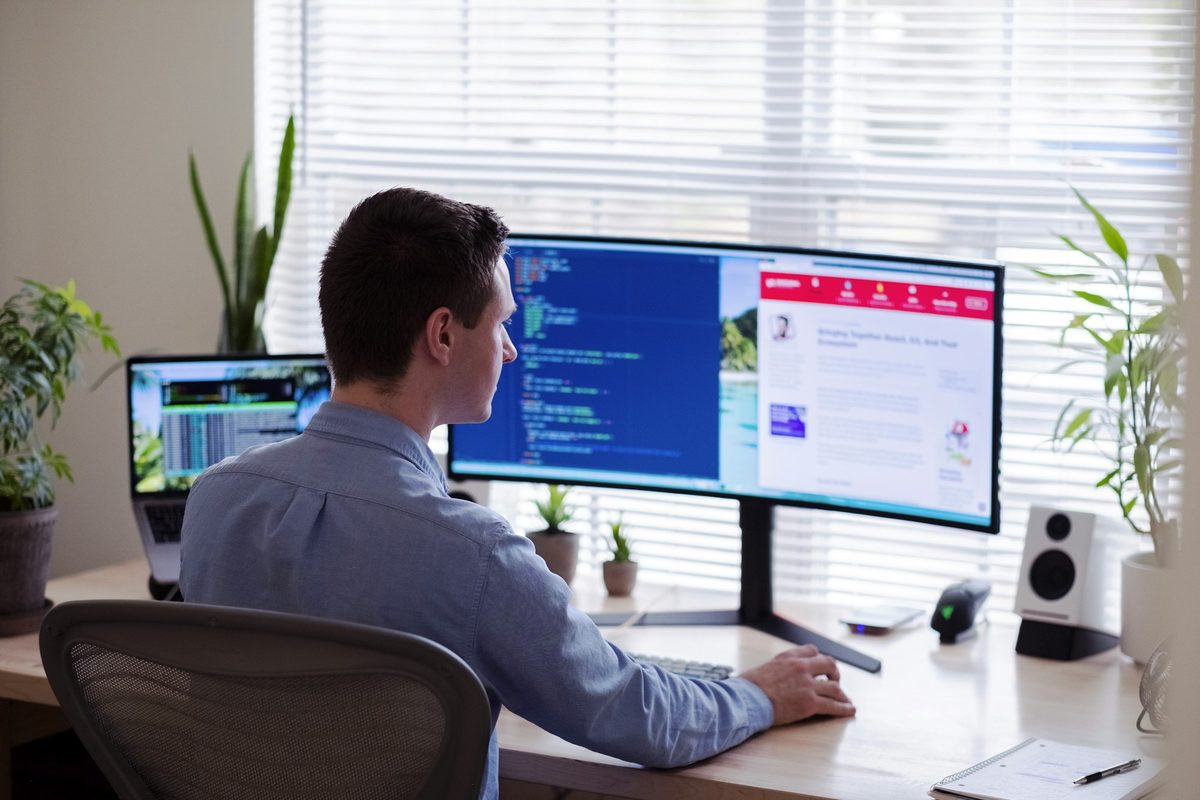
Someone working at a bright, plant-filled desk with a wide monitor, headphones on, focused on their screen.

Timer

02:14:33

● Running

Demo — activity scoring in action

0timesheets anybody has to fill in by hand
100%self-hosted — your server, your data
$149once, for unlimited people — no subscription

Start to finish

Four steps, and you have never opened a timesheet.

Zeetavix WorkOS is automatic time tracking for Odoo: tracked work becomes timesheets, attendance and project budgets on their own, self-hosted on your server. Every picture below is the running product on a seeded install — not a mockup, and not a rendering of one.

  1. 01

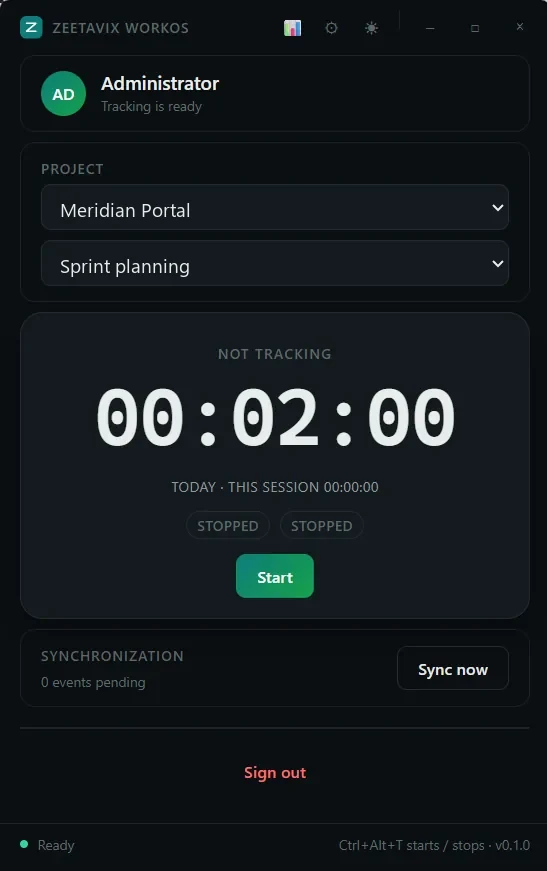
    Somebody presses Start

    Or the global shortcut, which is what actually gets used. The desktop app records the time and what was on screen; nothing is uploaded anywhere except your own Odoo.

    Get the app →
    The Zeetavix WorkOS desktop tracker: the signed-in person, a project and task picker, the timer, and the sync queue.
    The whole desktop app. A project, a timer, and a button.
  2. 02

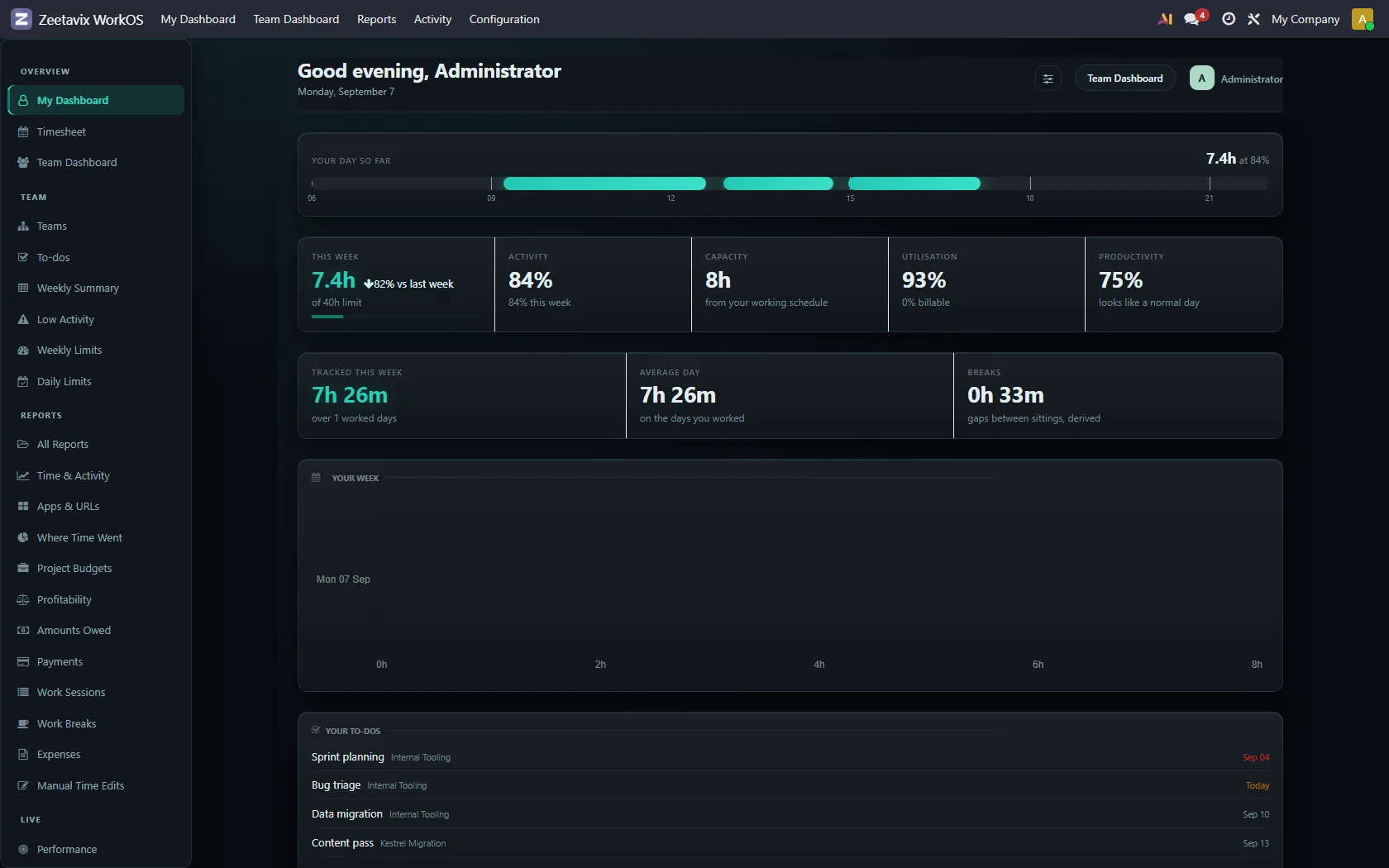
    Their day takes a shape

    Not just a total. The band shows when the work happened and how engaged it was, so a six-hour day made of twelve fragments does not read the same as one long morning.

    Read the chapter →
    My Dashboard: the day drawn as a band of tracked sittings, with hours, activity, capacity and utilisation beneath it.
    The day drawn against a clock, with the figures underneath it. The timesheet lines are written from the same record.
  3. 03

    Their manager gets a briefing, not a chart wall

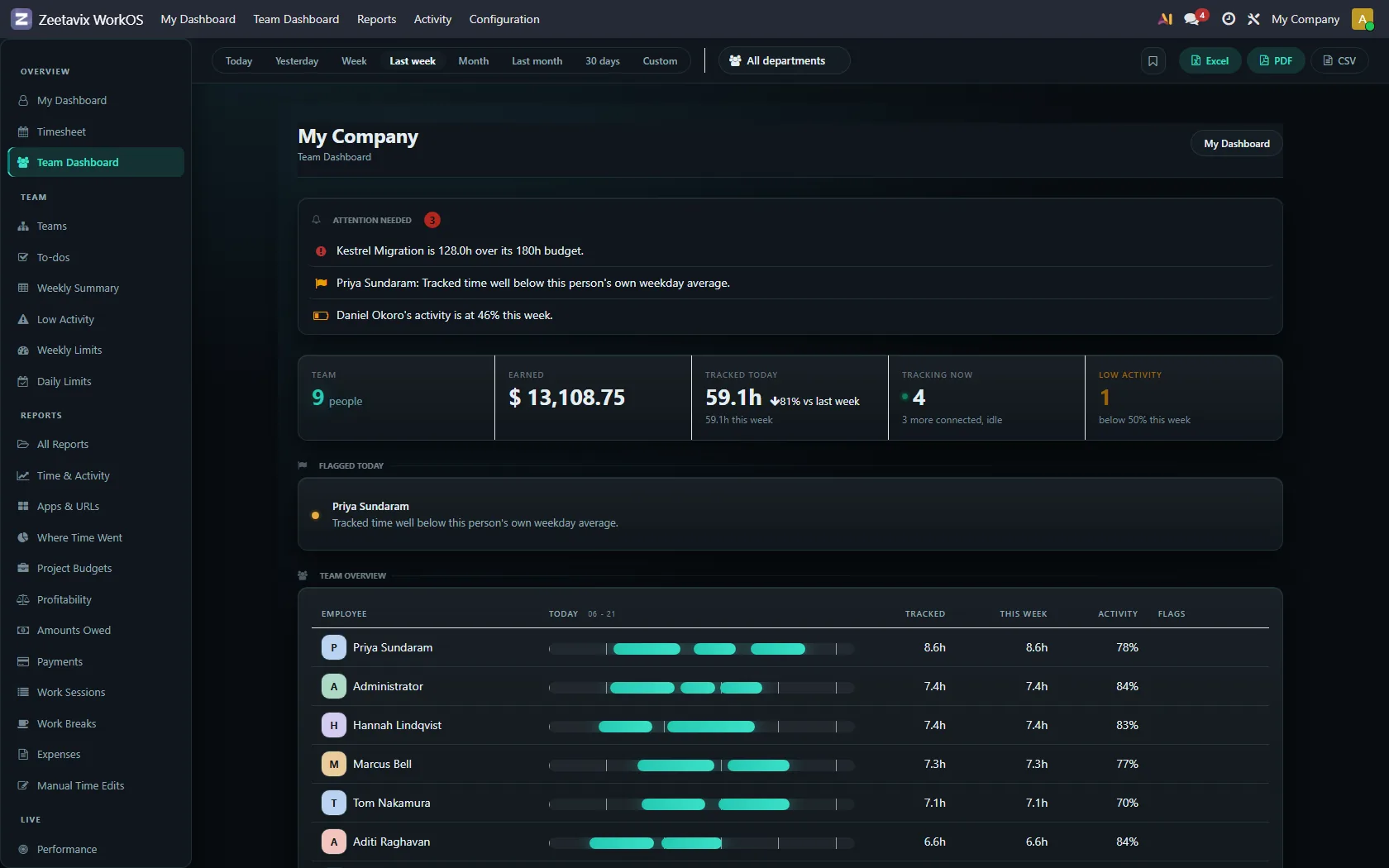
    Six things worth a decision today — a project over budget, somebody past their weekly limit, a day well below that person’s own average — each linking to the report it came from.

    Read the chapter →
    The team dashboard, opening with a ranked list of things needing attention.
    Attention first, then the totals, then the team.
  4. 04

    The hours become money

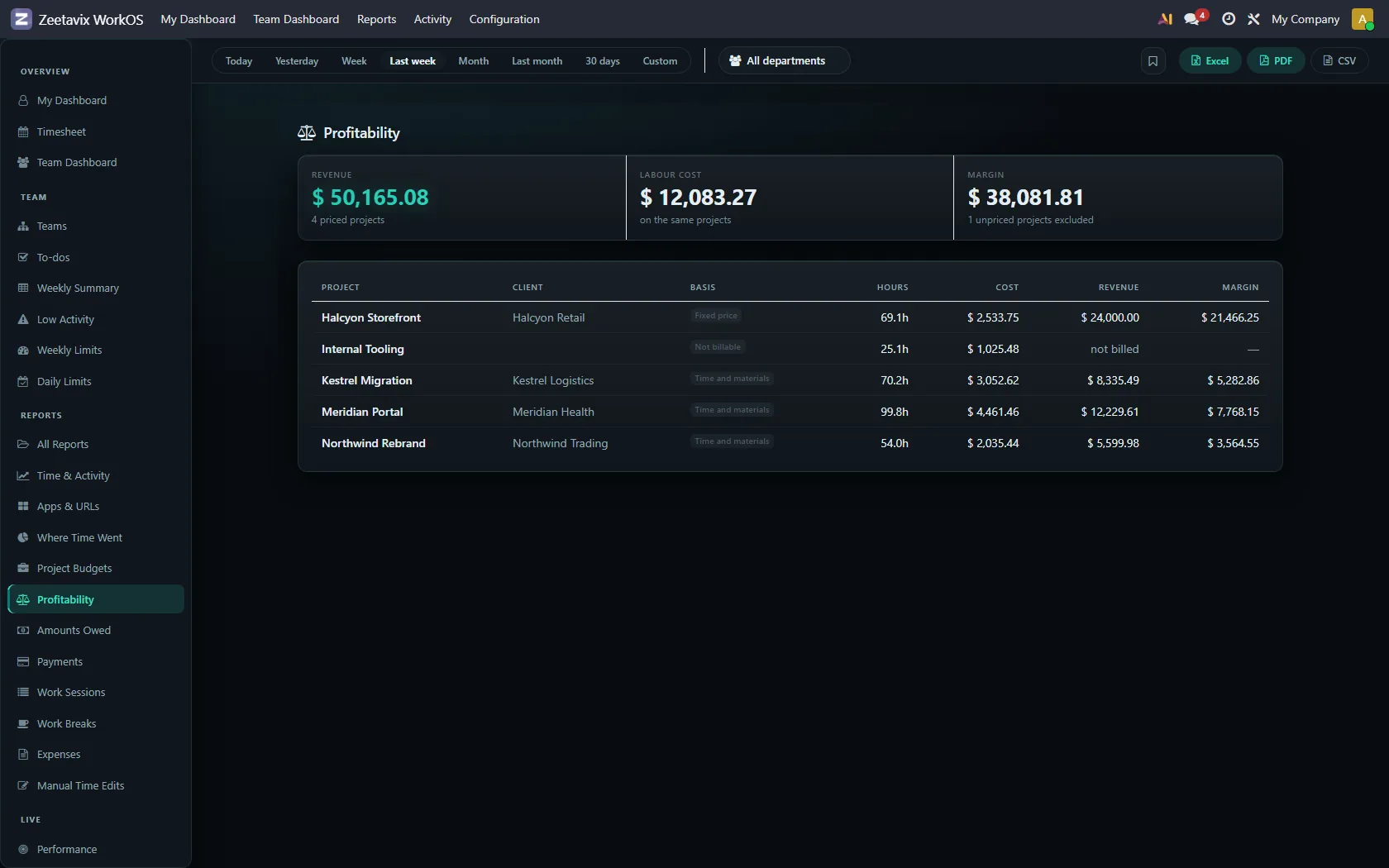
    Priced per project against the rates you set, with margin, what is owed and what is left in each budget. Gated separately from everything else, in two tiers: what work cost, and what it earned.

    Read the chapter →
    The profitability report: revenue, labour cost and margin per project.
    Revenue, cost and margin, per project.

Walk through all thirty-four screens →

What teams use it for

One record of the work. Six different jobs it does.

Tracking is the boring part. What makes it worth installing is everything that stops being manual afterwards — and none of it needs anybody to be watched over to work.

Timesheets nobody writes

Tracked work becomes Odoo timesheet lines as it happens, on the right project and task, with an AI-written description of what the stretch actually was. Friday afternoon stops being an archaeology exercise. How Odoo automatic timesheets work.

ProjectTaskHrs
AtlasPayment retries1.6
AtlasCode review0.8
AtlasWebhook signature fix1.4

Attendance without a button

Clock-in and clock-out derived from when real work started and stopped. No forgotten punches, no Monday-morning corrections, and it feeds Odoo’s own attendance records rather than a parallel system.

09:12 17:48

Derived from the first and last real activity — nobody pressed anything.

Budgets that move in real time

Hours land against project budgets in actual money as they are worked, so a project going over is something you notice in week two rather than at invoicing.

Project Atlas$13,600 / $20,000

68% spent in week 2 of 4. That is the week to know, not the invoice.

Where the week actually went

Four uninterrupted ninety-minute blocks and eight hours cut into forty fragments are the same number on a timesheet and completely different weeks. Focus reports show the difference — measured against the person’s own role, not one company average.

Both weeks: 30 hours.

Credit where it is due

A leaderboard and daily achievements built from real contribution rather than who is loudest in standup. Quiet people who deliver stop being invisible, which is the part most managers say they cannot fix.

1Ravi
2Meera
3Sam

Meera said the least in standup all week.

The receipts, if you ever need them

Every timesheet line can produce the work behind it. Most months nobody opens it. The month a client disputes an invoice, it is the only thing that matters.

Role-aware throughout: LinkedIn all afternoon is the job being done in marketing and a question worth asking in engineering, and using an AI assistant is dense senior work rather than an idle keyboard. A tracker that cannot tell those apart produces numbers no one should act on.

The question you are about to ask

“Doesn’t Odoo 20 already do this?”

Partly, and we would rather say so plainly than have you find out after buying. Odoo’s Timesheet Assistant reads desktop activity and suggests entries. It is genuinely good. It is also built for a different person.

Odoo’s Timesheet Assistant

Built for the employee

  • Suggests entries from desktop activity
  • Data stays on the employee’s machine — a manager sees none of it
  • They review, edit and ignore whatever they choose
  • No screenshots, no evidence trail
  • Enterprise only

Zeetavix

Built for the team and whoever runs it

  • Timesheets, attendance and budgets filled in for everyone at once
  • Focus reports, leaderboards and AI briefings on top of the same data
  • A manager can see the team's week, not just their own
  • Role-aware: LinkedIn is work for marketing, not for engineering
  • Runs on Odoo Community

If each person only needs help filling in their own timesheet, use Odoo’s — it is free with Enterprise and it is good at that. Buy this when you want one picture of the whole team’s work: budgets, focus, attendance and recognition running off the same record, on Community, with the receipts there if a client ever asks. Read the full Odoo Timesheet Assistant comparison.

Why this is different

We have nowhere to put your team’s screen.

Most tracking tools are hosted services: the screenshots and the activity go to their servers, and you take their word for what happens next. Zeetavix has no server in the picture. It runs inside the Odoo you already host, writes to your own disk, and there is nothing for us to see even if we wanted to.

Screenshots never travel

They are written to your own disk, by your own Odoo. There is no bucket of your employees' screens sitting in someone else's cloud account — which is also why we can give you unlimited screenshots while others meter them.

Your AI, your key

Run Ollama on your own hardware and nothing leaves at all. Or use your own key for OpenAI, Claude, Gemini or OpenRouter — your Odoo calls them directly. We never see the key, the prompts, or the answers, and we add no markup.

Nothing is sent to us. At all.

Not your data, and not a licence check either — the agent used to ask us hourly whether your subscription was still paid, and that call is gone with the subscription. Zeetavix now receives no request from your installation of any kind. Not a policy we promise: there is no endpoint left to call.

Nothing to migrate off

Stop paying and tracking stops — every timesheet, screenshot and report already in your Odoo stays exactly where it is. It was always yours, on your machine. There is no export to request and no account to close.

Which makes the compliance conversation short: under GDPR and India’s DPDP Act you remain the sole controller of your employees’ data, because no processor ever receives it. How self-hosted employee time tracking works.

What's inside

One dashboard. The whole team's week, without asking anyone for it.

Zeetavix WorkOS · Team Dashboard
The Zeetavix WorkOS team dashboard: an attention-needed briefing, team totals, and one row per person showing the shape of their day.
The team dashboard, as it renders. It opens with the six things worth a decision this morning — over-budget projects, people past their weekly limit, days that fell well below somebody’s own average — each linking to the report it came from.

Walk through every screen →

Built for Odoo

One system, on your server. Nothing leaves it.

Timesheets, attendance, projects, budgets and the evidence trail are Odoo’s own records, filled in. There is no second database, no sync to reconcile, and no Zeetavix server in the path at all. Time tracking for Odoo Community explains the setup.

See exactly what runs where →

Getting set up

Three steps, in order.

  1. 01

    Get the Odoo module

    A one-time $149 purchase that installs into your own Odoo Community server — installation and 90 days of support included. See exactly what you pay.

  2. 02

    Install the tracker

    Runs quietly in the background once it's in. Full activity tracking is Windows today; macOS and Linux are in development. The desktop apps are free, on every platform, for as many people as you like.

  3. 03

    Sign in with Odoo

    No separate password to invent or remember — approve the device from your own Odoo login.

A laptop open on a plain wooden desk, showing the kind of quiet, ordinary desk the agent runs on in the background.

Set it up once. Own it for good.

$149, once. No migration off your own server, ever — because there isn't one to migrate off of.

Get it on the Odoo Apps Store