Guide · Chapter 9
Settings, privacy and retention
What is captured, who can read it, how long it is kept — and how to check the deletion is actually running.
Monitoring software is only worth having if you can check what it is doing. Every switch here explains itself on the screen rather than in a manual, because the person making the decision is usually not the person who installed it.
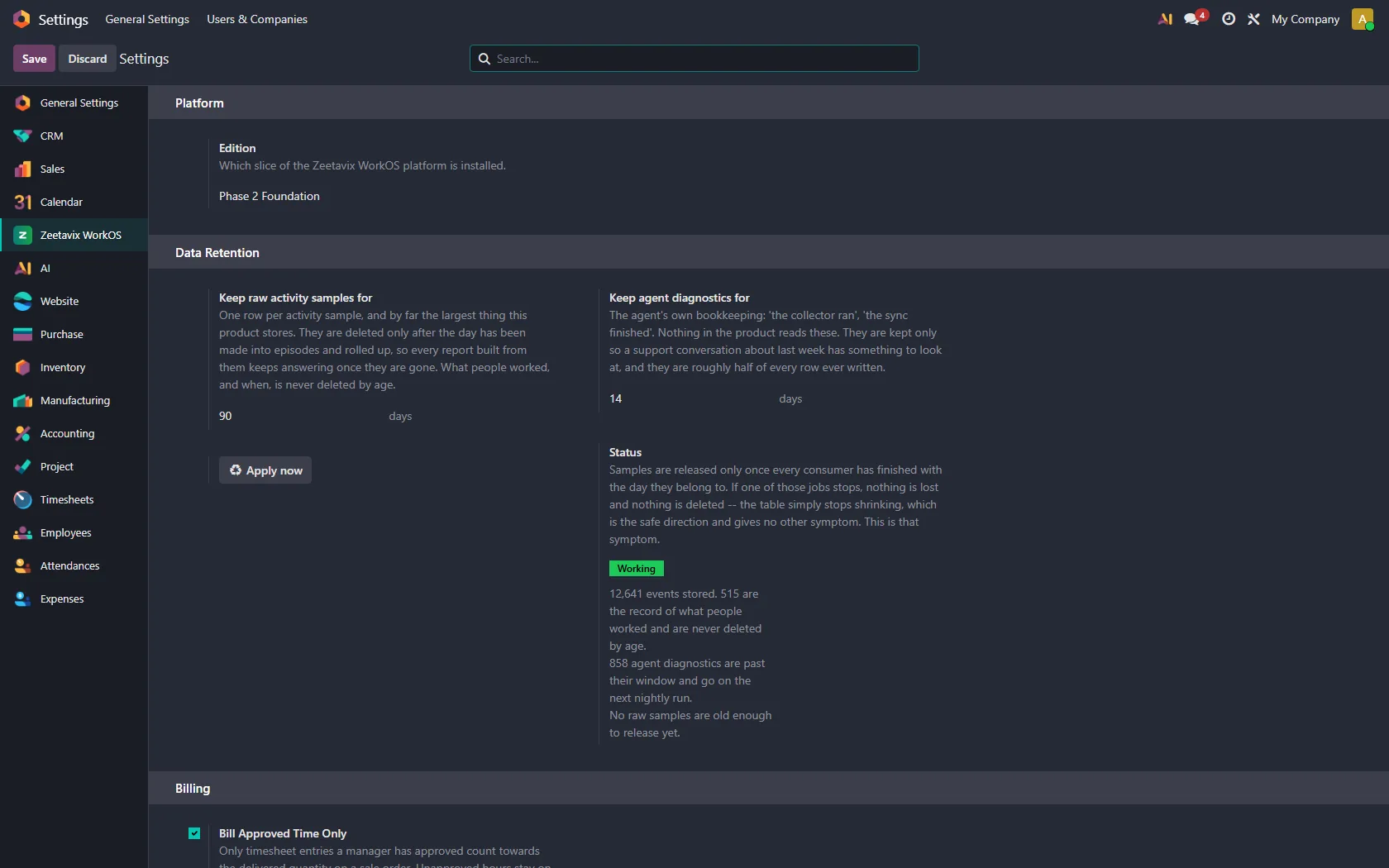
Retention: two clocks, not one
The product stores three different kinds of thing, and they do not deserve the same lifetime.
- Raw activity samples — one row per sample, by far the largest thing here. They are deleted only after the day they belong to has been made into episodes and rolled up, so every report built from them keeps answering once they are gone.
- Agent diagnostics — the agent’s own bookkeeping: “the collector ran”, “the sync finished”. Nothing in the product reads these. They are kept only so a support conversation about last week has something to look at, and they are roughly half of every row ever written.
- What people worked, and when — never deleted by age. It is the record a timesheet points at.
A sample is only deleted once every job that needs it has finished with the day it belongs to. If one of those jobs stops, nothing is lost and nothing is deleted. The table just stops shrinking. That is the safe direction to fail in, but it is also the only symptom, which is why there is a health check.
The health check
Under Status, in plain sentences: how many events are stored, how many are the permanent record, how many diagnostics are past their window and due on the next nightly run, and whether any samples are old enough to release yet. A green Working means the pruning is keeping up. If it is not, this is where you find out — rather than from a disk filling up in six months.
Apply now runs the same job the nightly cron runs, so you never have to wait until tomorrow to see whether a setting did what you expected.
Screenshots
Off unless you turn them on. When they are on, images are blurred and downscaled on the machine before anything is uploaded, and the picture itself is restricted to managers and above. A captured screen is the most revealing thing this product holds.
Everybody can see and delete their own screenshots within the deletion window you set. When retention removes an image, the event stays: it is still evidence that work was happening at that moment. Only the picture goes, and the record says it was deleted on schedule rather than leaving an unexplained gap.
In most places you are legally required to. Everywhere else you should anyway. The product will not do it for you.
AI, and where it runs
The daily summaries are generated from classified activity, not from raw keystrokes or screen contents. You choose the model, and a local one is a first-class option — the whole point of self-hosting is undone by shipping the day’s work to somebody else’s inference endpoint.
Billing approved time only
When set, only timesheet entries a manager has approved count towards the delivered quantity on a sales order. Unapproved hours stay visible and stay uninvoiced, which is the difference between a tracking tool and an invoicing accident.